Saturday, June 8, 2013

Using TDD (Test Driven Development)

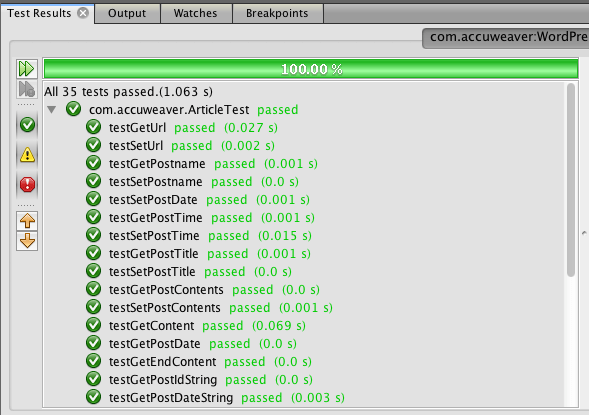
Screen Shot 2013-06-08 at 10.35.06 AMIf you read my previous post (WordPress Recovery), you know I've been writing some code to recover my old posts. It occurred to me I could take a small segment of what I've been doing with that code to demonstrate my approach to TDD.

Since I'm a hacker from way back, and also because I was in semi-panic mode about losing the content, I didn't approach this task with testing in mind. Now that doesn't always result in bad code: I've been doing this long enough that I can usually think through a fairly good model and code something that isn't one long method full of inline code.

In this case however, once I had started coding, I realized again that this was an opportunity to practice coding the "right" way. I had already begun with a Maven project, and generated unit tests as I went through the process of starting to build the code, so I had at least some good functioning unit tests.

Monday, May 27, 2013

WordPress Recovery

Well, I have the basics of my blog recovered now, so almost all of my posts going back several years are once again available.

In my last post titled Lesson Re-learned: Backups !, I admitted that I had committed the cardinal sin of making changes to my web site without doing a backup first (walking the tightrope without a net).

Luckily for me I had installed the WP Super Cache plugin, so all of my content actually still existed as static files, and being a bit of a hacker, I was able to throw together some code to effectively recover my posts.

Sunday, May 19, 2013

Lesson Re-learned: Backups !

[caption id="" align="alignright" width="239"]Homer Simpson Homer Simpson (Photo credit: Wikipedia)[/caption]

I just shot my blog in the foot, or more accurately, I didn't follow IT 101 and back things up before making a change.

I had moved my site to be completely WordPress based a while ago, and as a result I had a bit of a convoluted setup on my server.

When I first set up my WordPress blog it was as a sub-domain of accuweaver.com, and was housed at http://wordpress.accuweaver.com/ (also aliased to http://blog.accuweaver.com/). The http://www.accuweaver.com/ site just static pages that hadn't changed for years.

So when I finally got my blog set up to host the few static pages I had, I just changed the directory on my server to have a symbolic link to the directory where wordpress.accuweaver.com had it's content:

  1. Removed the directory httpdocs from /var/www/vhosts/accuweaver.com

  2. Added a link in that folder to /var/www/vhosts/accuweaver.com/subdomains/wordpress/httpdocs.


This actually worked really well, since the content was only in one place, and all I had to do was change the host name in WordPress.

Friday, May 3, 2013

How to Get a Google Voice Number for Your Own Email Address

If you want to use some Google services (like Google Voice), and have them associated with your own email address, it’s not all that difficult.

First, if you already have a Google account (like a GMail address), you will want to log out of by clicking on your name or icon up in the upper right corner of any Google app, and then click the “Sign Out” button:

Sign Out of Google

Thursday, April 4, 2013

Unnecessary Drama

I have a theory that as human beings, we create a lot of unnecessary drama because of misunderstood communication. And in most cases the intent of the message is something good, but what’s received, well, not so much.

Political leaders have this worst, since every sentence they utter goes under a microscope and is often compared to every other thing that they ever said. A leader can, for instance, think that they are rallying the troops to liberate a country’s people from oppression, and be understood as a crusader trying to impose his views on the rest of the world.

Friday, March 29, 2013

Just Git’R'Done on Gun Control


1967_Dead-Eye_Rob
When I was in third grade, we lived in Fairbanks Alaska, and I wanted to be a grown up. Because Alaska is frontier wilderness, a lot of the activities I remember were around doing things in the outdoors with the family.

I wanted to be grown up, so I got a paper route (at eight years old I was the youngest one they’d ever had). I remember that I had to borrow my Dad’s typewriter to write the circulation department telling them why I wanted to be a paper boy.

I also remember my parents making me take my little brother with me so I wouldn’t get into trouble and getting into trouble anyway (but that’s a whole bunch of different stories).

Monday, March 25, 2013

Creating a New App (step 1)

I decided I’d walk through creating a new app to replace one I’ve used for years on my iPhone that no longer appears to be maintained. The app in question is called GasBag which as near as I can tell stopped being updated in 2009 (see: http://blog.jam-code.com/).


I could just write a quick and dirty web app to store my mileage, but I figured I’d approach this as an exercise in building an iOS application with a design first approach.


At a high level, what I want is an app that easily captures my mileage, and allows me to save that information somewhere that won’t get destroyed. There are a number of features that GasBag had that I liked (for instance being able to send an email with my mileage information), and a number that it doesn’t have that would be nice (like allowing me to use it for multiple cars, or to do some data capture from a gas station receipt).


Saturday, March 16, 2013

Communication Lessons from Mom

I grew up in a fairly large family: three boys, a girl and Mom and Dad. We had a gazillion aunts, uncles, cousins, grandparents , relatives and friends.

Because of this, there were a LOT of communication channels, and as a natural part of her position in the family, that meant that Mom was a hub to a LOT of that communication.

So as we all grew up, and moved on with our lives, I began to see something interesting happen: because we all spoke less frequently, there would be times when we would hear about things in a very delayed fashion.

“Oh that was probably around the time that Aunt Jo died”

“Aunt Jo died?”

“Oh, I thought I told you, that was last year”

It took me a while to figure out what was going on, and see this sort of thing happen in my own life. As near as I can tell there are a few of reasons why we as humans have trouble with complex communication channels like the one I see in my family.

Reason 1 – Once we plan to communicate, we forget to do it.

Especially when we are busy, and have limited interaction with people, it is easy to plan to give a message to somebody and then get distracted with other things. In the case of the family dynamic, as we were no longer all in the same household, fewer opportunities to actually say the things that are planned to be said wer available, meaning there were more opportunities for distraction between plan and action.

Reason 2 – Once we verbalize to some people, it’s hard to remember who we talked to.

A huge survival trait we all share as humans is generalization, and our subconscious tends to exhibit this with the people we are closest with. If you’ve ever heard a parent run through all the children’s names before hitting the right one, you know what I’m talking about.

And because the subconscious doesn’t really differentiate much between planning to do something and actually doing it, the plan we made to talk to four other people, really does seem complete once we’ve talked to some portion of them, because we thought about talking to them all.

Reason 4 – Priorities change.

When we plan to communicate, we know it’s important but with limited opportunity for that communication, other things come up that mean we don’t get around to it, and it no longer seems as important. In the fictitious “Aunt Jo” example, time has passed, mourning is done, and there’s not usually a reason to remember that we never had that conversation we meant to.

Reason 5 – We remember good things better than bad.

I’m a firm believer that it’s important to give feedback immediately, especially when it’s about something bad that happened. I also believe that over time, we remember the good moments in our lives better than those that aren’t as positive. That’s why when you think about the music that was on the radio when you were in high school, all sorts of wonderful tunes pop into your head, but when they actually play the top 40 from that same year, you hear some things that make you smile and wonder why they were popular.

This is probably another survival trait: I know for me, I can remember what to avoid, but the memories for what a burn feels like, or how much it hurts to skin my knee, is not nearly as vivid as what it feels like to hug my wife, or have that wonderful feeling of contentment after a holiday meal.

So if communication about something bad gets delayed long enough, it’s human nature not to bother with it. Not only do we  want to avoid dredging up things that aren’t fun, but the value of doing so has diminished, and so we just choose to forget (and maybe can’t remember).

So my solution for the Mom Communication Event ?

It’s really the same goal with every bit of communication, test that the message you sent was the one received. I used to wonder why people used to say “Did I tell you about …”, but now I know why, they were just being human, AND being good communicators, just like my Mom.


Danger of Time Saving Tools

I was reminded a couple of days ago of the danger of using tools that help you to get things up and running quickly, by a question that I was asked in an interview. The question was pretty simple, but not something I’d thought about for a while, which was: “What are the verbs used in RESTful services?”.

Now intuitively I know that answer, but hadn’t really thought about it for a while, so I basically answered incorrectly (mostly because I suck at inteviews), only remembering that you do GET and POST in HTTP, so responding that GET is to query and POST is for inserts/updates.

Of course I know the reality (and one of the advantages) of RESTful services is that they behave by contract, so they can use the full complement of the HTTP verbs, and the convention is to use each one for a specific purpose:

  • GET – used to get or retrieve a resource (always returns the same resource for the same query).
  • POST – used to create a new resource (returns the location for the newly created resource).
  • PUT – used to replace a resource (typically an update).
  • DELETE – used to remove a resource
  • OPTIONS – sometimes used to describe information about what verbs a service can use for a specific URI (not normally implemented however).

But the last few times I’ve done RESTful services, I’ve simply let an IDE generate them for me, so I haven’t even thought about those last statements. In the IDE, all I had to do was say I wanted to add REST (using Jersey) to my session beans, and voila, I have a full fledged RESTful service.

And of course on the consuming side, all I have to do is call the right method, and under the covers the Jersey client stuff does the right thing about which verb to use. So I’m not actually thinking about what’s under the covers, and because of that wouldn’t be quick on my feet about how the service is constructed under the covers.

There are of course pros and cons to approaching code in this way. In the early days of writing code, we all had to know what the machine language underneath looked like. Modern languages hid that complexity from us, and reading assembly language became a lost art practiced by rocket scientists and performance gurus.

By hiding the complexity we have been able to develop insanely complex applications that would not have been possible without those building blocks. Freeing ourselves with increasingly general patterns in code, we are able to focus on solving the problem at hand, and stand on the shoulders of those that go before us in doing so.

I don’t expect to need to write a RESTful service from scratch any time soon, but it is a good reminder that when you rely on tools to build your code, you are risking living with a lack of understanding of the underlying mechanism, which could make it difficult to know about the pros and cons of a solution.


Tuesday, March 5, 2013

Moving to GMail on your iPhone

After moving from a hosted Exchange service to GMail, you need to set up your email client on the iPhone so that it will receive the push notices.

To do this, you need to add a new Exchange service on the device. There’s a nice step by step of this at http://support.google.com/a/users/bin/answer.py?hl=en&answer=138740

Alternatively, you can use the standard GMail settings, on the iPhone, but my favorite approach is to actually use the GMail app from Google in the App Store. The reason I like that app over the standard iOS mail app is that it is much more of a true mobile client that takes advantage of the platform.

First get the App from https://itunes.apple.com/us/app/gmail-email-from-google/id422689480?mt=8

GMail in the App Store


You can do this either from your iPhone/iPad directly, or using the iTunes store on your Mac/PC.

Once you have the app installed, you need to set up your GMail accounts. Either tap “open” from the App Store page about GMail, or find the GMail icon and launch it.

On launch the app will prompt you to log into your account. For a Google Apps account, this will be the email your administrator assigned you like rob@mydomain.com, and the password that you’ve set up previously by going to http://gmail.com.GMail login

Launching the App the first time takes you to the login page, where you can type in your email address and password. Note that this is the same whether you are logging in to a GMail account or a Google Apps account, to Google they are just different users as far as mail goes.


Inbox
Once you log in, you will be shown the inbox for that account, and be able to read your email pretty easily. To navigate the folders (like sent, draft, etc), you tap on the little icon in the upper left corner that looks like a box with stacked bars.

This will cause the folders and settings pane to slide out from the left and reveal your email structure so that you can choose. Clicking on a particular folder will display that list in the same fashion as you saw with the inbox.

Folders

Additionally from this screen, you can add other email accounts by tapping on the profile area at the top of the pane, which slides the list of accounts down and changes the direction of the panel indicator at the top of the pane.

If you’ve already done this, you will see the list of accounts, and each one will be badged with the number of unread messages. Adding a new account is as simple as tapping the large plus icon and logging in. Tapping on a profile picture will switch you to that account once you are logged in.

AccountsThe little gear icon in the upper right of this corner brings up settings for you email where you can set a few things (such as vacation responder, signature, etc).

Loading new account

Once you log into the new account, you will again see the loading page, this time with the image from the new account’s name and profile image

The next time that you go to the account selection page, you’ll see a list of accounts with the icon for each badged with the number of unread messages showing so that you can easily see what needs your attention at the moment.

Google apps on the iPhone are a mixed bag, with some being native, and others not, so it’s also a good idea to set up the Apple “Mail, Contacts, Calendars” for synchronization of those things (which can use the Exchange push in the same way as an actual Exchange server).

Multiple accountsThe best way to do this is to follow the instructions at http://support.google.com/a/users/bin/answer.py?hl=en&answer=138740

First go to your settings (normally you can find this by clicking the home button on and looking for the gear icon that says “Settings”.

Adding an account to your iPhone

If you’ve previously added accounts, the “Add Account …” will appear below the existing account settings list (in my case I actually have to scroll in order to get to this button.

Tap on the add account button and you’ll be presented with the choice of types of account that you want to use. You can use GMail here, but I prefer to use Exchange simply because it pushes the information to the phone asynchronously

Exchange account iPhone

Once you tap on the Exchange button, you’ll get a new page that prompts you for the authentication information. This uses Microsoft’s autodiscover method to figure out how the account should be configured.

Account login

Type in the user name and password for your account here, and give it a description. Typically I use the name of the company that has the domain that I’m adding (for example PMI-SFBAC for my pmi-sfbac.org address).

Then click the “Next” button which should bring up the Domain screen. The only thing you need to make sure of is that the server ends up being m.google.com, and that you still have the right username and password. To continue,  tap “Next”.

Domain Settings

The final step is to choose what you want to be pushed to your phone. Generally the important ones are the contacts and calendars, since those are business related.

Choose what to push

It really doesn’t hurt to have Mail turned on as well, since that keeps your inbox in the iOS Mail app up to date, but if you’re worried about your data plan, just set up the contacts and calendars, since that is the part that the GMail app won’t really be as helpful with.


Monday, February 25, 2013

Eventbrite Calendar Feed

Screen Shot 2013-02-25 at 9.16.20 AMI volunteer and provide technical support for a few non-profits, one of which is the Project Management Institute San Francisco Bay Area Chapter (http://www.pmi-sfbac.org) where I serve as the VP of Operations and CGO.

One of the moves I made in my first year with them was to migrate our event calendar to Eventbrite and Meetup. One of the gaps I found with Eventbrite is that it doesn’t have a way to provide a feed of events that can be used to update an external calendar, so I embarked on a little programming effort to create one.

Most calendar programs allow you to pull external events using the iCalendar (ics) format, and Eventbrite actually has a pretty decent API to allow you to pull the events, so I decided to write a simple PHP script to allow me generate an iCalendar feed.

Screen Shot 2013-02-25 at 8.47.53 AMThis started as a simple one-off for PMI-SFBAC, but has turned into an open source project at https://code.google.com/p/eventbrite-ics/

Looking at the code, you can see it’s pretty basic, just a few PHP classes, some unit tests, Netbeans project and data.

Once the code was working, I used the iCalendar validator at http://severinghaus.org/projects/icv/ to make sure the results are good, and (at least for PMI-SFBAC) they are.

Eventually this results in a URL that I used as a feed into the All-in-One Calendar from Time.ly which lets me show events on my site’s calendar along with any other iCalendar feeds I choose to add.

Screen Shot 2013-02-25 at 8.59.20 AMTo configure the All-in-One calendar, I just go to the Events in the WordPress admin panel, and add the feed.

After I add the feed I click the “Refresh” button to make sure the events show up on my calendar immediately. The events then get updated on a periodic basis (daily by default), and should keep you up to date.

Screen Shot 2013-02-25 at 9.06.58 AMAnother use I put this feed to is to add the Eventbrite calendar to my Google Calendar.  I have a calendar feed from Meetup, and several of my friends so that I can quickly see what is going on that day.

The same basic idea for Google Calendar: you go to your Google Calendar, click the drop down on “Other Calendars” and choose “Add by URL”.

This gives you a nice view of events so that when you are scheduling things you can see what’s coming up that you might be interested in.

For those of you poor souls still using Outlook, the same feed can be used there as well see: http://office.microsoft.com/en-us/outlook-help/view-and-subscribe-to-internet-calendars-HA010167325.aspx


Wednesday, January 30, 2013

Changing a Web Site to use hosted WordPress

I got an email from my friend Athens who had just relaunched her web site at http://www.athenskconsulting.com/ but was now having problems with email.

The first thing I did was to run over to the MX Toolbox site to see what was going on with her servers. A quick look and saw that her mail servers were pointing to mail.athenskconsulting.com, which resolved back to her WordPress blog.

Before she pointed everything to her WordPress site, everything had been working. Unfortunately, the directions at http://en.support.wordpress.com/domains/map-existing-domain/ had given her some unfortunate information, that really weren’t accurate for what she was trying to do.

Her DNS and email were previously hosted at GoDaddy (along with her old web site), and all she was really trying to do was to get her company URL to point at the blog site that she’d set up on WordPress. The instructions I mentioned before give a way to accomplish that, by repointing the domain DNS servers to be the ones that WordPress provides.

The unfortunate thing about that approach is that in order for this transition to happen smoothly, you have to transfer all of your DNS records into the WordPress settings so that things like your mail server will continue to work (following the instructions at http://en.support.wordpress.com/domains/custom-dns/

Now this might be OK if you are a geek and know what MX and CName records should look like, but typing in a DNS file in the format that WordPress expects it is much more difficult than using the GoDaddy DNS control panel (which helps prevent you from making mistakes).

I got on the phone with her, and the first thing I had her do was to switch her DNS servers back to GoDaddy. This is done by going to the Domain Manager page in GoDaddy and looking for the section that says “Name Servers”.

Screen Shot 2013-01-30 at 4.10.04 PM
Clicking on the link that says “Set Nameservers” brings up a dialog that allows you to set the DNS (which had been set to the WordPress servers per the instructions mentioned previously):

Screen Shot 2013-01-30 at 4.10.23 PM


This of course fixed the mail problem (along with other URL’s), but broke her web site again (which I expected it would).

We then clicked the “Launch” link on the same Domain Manager page by looking for the section that says “DNS Manager”:

Screen Shot 2013-01-30 at 4.05.29 PM


This brings up the actual DNS zone editor that I talked about previously. Now the first thing you should do is to back up the zone records by using the import/export button on the DNS manager:

Screen Shot 2013-01-30 at 4.17.11 PM

This gives you the basic information that you might have needed if were you going to follow the instructions on the WordPress site. It creates a text version of the information of the DNS Zone records in a standard format.

But unless you really need to move off GoDaddy for some reason, you don’t want to do that. Instead, you just need to set up a wildcard CNAME record for the WordPress blog, and make sure to remove any old A records that might be pointing to the wrong place.

So for Athens, we needed to delete all of her “A” records (since she no longer has a physical server), and add a CName that looked like:

wildcard

And once DNS propogated, she was up and running again at http://www.athenskconsulting.com/

A quick trip back to the MX Toolbox site to check and her mail servers are now pointing back to GoDaddy again:

Screen Shot 2013-01-30 at 4.46.18 PM

Clicking the link that says “ns lookup” shows that the domain is now using the GoDaddy DNS servers again:

Screen Shot 2013-01-30 at 4.46.26 PM

The one other thing I do to make sure things are working is a DNS propogation check (http://www.whatsmydns.net/), which shows which servers will resolve the host and which don’t.
Screen Shot 2013-01-30 at 4.55.21 PM

All the little green checkmarks mean everything is happy all around the world, and now everybody is resolving her site properly.

So in summary: if somebody tells you to change your DNS servers, think first and see if an alias will work better …

Friday, January 25, 2013

Unexpected Consequences – Jenkins and PHPUnit

I am a big fan of Test Driven Development (TDD) and tools like Hudson/Jenkins to automate the process of having a continuous integration build system are key.

On my current project we recently started moving things to Amazon EC2, and rather than put everything on one big server, I thought I’d follow the best practices in cloud computing and make a number of small special purpose servers to take care of the project’s needs.

We’ve had a Jenkins server running for a bit, so rather than reinventing the wheel, I figured I could copy my Jenkins configuration to a new server and get things up and running.

I fired up a new Tomcat server on Amazon Elastic Beanstalk, and loaded up the Jenkins WAR file, which quickly got me to a working Jenkins server. This project is written in PHP, so I had to install PHP after that, which meant logging in to the server and running through the whole PHP and PHPUnit setup.

Once that was done, I scp’d the Jenkins folders from the old server, edited the Tomcat startup files to include the environment variable to point Jenkins to the right place, changed a few permissions, and everything appeared to be working.

I could log in, I fired up the build, and it appeared to be running – very cool.

But that was when the flaw in the design of the PHP unit tests was exposed ….

I was watching the output of the phpunit tests, and noticed two things:

  1. The tests seemed to be taking a really long time
  2. Every test was failing

Watching the console, each time a test would fail, the little “E” would print, then a few seconds would go by and another “E” would appear. Finally after many minutes (because we have a LOT of classes to test) the error output appeared, and looked something like this for EVERY test:

     [exec] 1) aa_accounts_controllerTest::testMainSingle     [exec] PHP_Invoker_TimeoutException: Execution aborted after 1 second     [exec]      [exec] /home/jenkins/workspace/ftp_final/db/database_error.php:7     [exec] /home/jenkins/workspace/ftp_final/db/database.php:87     [exec] /home/jenkins/workspace/ftp_final/db/aa_accounts_db.php:42     [exec] /home/jenkins/workspace/ftp_final/model/aa_accounts_model.php:177     [exec] /home/jenkins/workspace/ftp_final/tests/apps/abstractAaAcountsTest.php:64     [exec] /home/jenkins/workspace/ftp_final/tests/apps/aa_accounts_ControllerTest.php:17

And of course there were 5297 of these … I did some Google searches for the PHP_Invoker_TimeoutException which mostly pointed to issues with upgrade from one version of PHPUnit to another, but the versions on the old server and this one were the same.

So my next step was debugging an individual tests. Running the test from the command line gave me the same error, odd. But then I ran the test using php instead of the phpunit call, and found the problem: I was getting a timeout trying to open a database connection.

The issue as it turns out, is a design flaw in our code that hadn’t showed up before: all the classes invoke a database connection class that sets up the connection to the database as soon as they are loaded.

Since the Elastic Beanstalk server was in a different security group than was allowed to connect to the RDS database, it was unable to connect at all, and PHPUnit would simply timeout before the connection failed (by default phpunit sets 1 second as the acceptable for a test to run in order to catch endless loops).

Now in theory our tests shouldn’t be hitting the database (at least not for these unit tests since we don’t want them updating anything on the backend), so this problem turned out to be very fortuitous. Because the Jenkins server couldn’t reach the database, it exposed a flaw in our unit tests: we weren’t mocking all the things we needed to, so the tests were actually opening connections to the database.

With some refactoring of the test classes to mock the database access layer, the tests all succeeded. Next we’ll need to do the actual DBUnit tests for the database, and Selenium or HTTPUnit tests for all the front-end and AJAX stuff.

Saturday, January 12, 2013

JPA and Maven and multiple persistence units

I needed to convert an existing Netbeans build to use Maven in order to stabilize the code and support Test Driven Development.

Generally this was a fairly simple process: just move all the source files and resources to the right folders in a new Maven project, and add the dependencies.

Everything was going swimmingly until I ran my first tests and got this really lovely set of errors that didn’t really tell me what was going on:

javax.annotation.processing.FilerException: Attempt to recreate a file for type com.omnistools.GaclAcl_

Now at this point I normally just do a few Google searches and find out how somebody else has solved this problem, but I really wasn’t having any luck at all finding an answer.

I did run across a couple of posts that mentioned seeing this error when using multiple persistence units in the persistence.xml.

Now my project does have a persistence unit for testing outside GlassFish (my chosen EJB container), so my first thought was to move that PU to the “right” place for my tests. So I copied the persistence.xml from src/main/resources/META-INF to the src/test/resources/META-INF and changed them so there was only one PU in each.

Well, that seemed to work for a minute, no more exception on the compile step. But now I had a new problem: I was getting an error that the PU couldn’t be found:

Tests in error:
testinsertTrackingCustomerUnFixed(com.omnistools.service.util.CompanyCustomerTrackingTest): No Persistence provider for EntityManager named ProjectTest-ejbPU
testinsertTrackingWithoutCustomerUnFixed(com.omnistools.service.util.CompanyCustomerTrackingTest): No Persistence provider for EntityManager named ProjectTest-ejbPU
testinsertTrackingCustomerFixed(com.omnistools.service.util.CompanyCustomerTrackingTest): No Persistence provider for EntityManager named ProjectTest-ejbPU
testinsertTrackingWithoutCustomerFixed(com.omnistools.service.util.CompanyCustomerTrackingTest): No Persistence provider for EntityManager named ProjectTest-ejbPU

So doing a bit of digging, it appears that the persistence.xml only gets copied once and only from the src/main/resources/META-INF folder.

I must have tried a thousand different permutations and combinations until I realized that I could have an ugly workaround that is not ideal.

The issue is that if both have the “exclude-unlisted-classes” set to true, the javac compiler tries to recreate the annotation classes during the compiler:compile and of course fails on the second PU because the classes have already been created.

So to get this to work, I set the “exclude-unlisted-classes” to false for one of the PU’s, which gets me the generated meta classes, and the tests fail (because the PU doesn’t include the required entities).

I then flip the flag back to true, and run the build again. Since the classes have already been compiled, the compile:compile doesn’t run, and the tests can succeed.

And then finally, I run across a bug report on the NetBeans site: http://netbeans.org/bugzilla/show_bug.cgi?id=183779. Now this bug talked about setting some compiler flags (in particular -proc:none which tells the compiler not to generate meta classes).

Workaround was proc:none to the javac compiler args as described here: http://maven.apache.org/plugins/maven-compiler-plugin/compile-mojo.html

        <plugin>            <groupId>org.apache.maven.plugins</groupId>            <artifactId>maven-compiler-plugin</artifactId>            <version>2.3.2</version>            <configuration>                <source>1.7</source>                <target>1.7</target>                <compilerArguments>                    <endorseddirs>${endorsed.dir}</endorseddirs>                    <proc:none/>                    <Xlint/>                    <Xlint:-path/>                    <verbose />                </compilerArguments>                <showDeprecation>true</showDeprecation>            </configuration>        </plugin>

Now my Maven build works like a charm. Both persistence units are defined in my persistence.xml, and both have the “exclude-unlisted-classes” set to false, and not only do my tests work, but the deployment is now successful as well.

Thursday, December 6, 2012

Java 7 and Mac OS X

After getting my new Mac Mini pretty well set up with my development tools, I started playing with Amazon AWS. When trying to connect to one of my instances using their built in tool, Firefox bailed and I was presented with a prompt asking me if I wanted to install Java:

To open “Firefox,” you need a Java SE 6 runtime. Would you like to install one now?

Now this message looked very official, and I’d seen it before when starting up something on a new Mac that required Java, but since I’d already installed the latest JDK I was thoroughly confused. I thought, “OK, maybe you didn’t install Java after all”

So I popped open a terminal and

mini:~ robweaver$ java -version
java version “1.7.0_09″
Java(TM) SE Runtime Environment (build 1.7.0_09-b05)
Java HotSpot(TM) 64-Bit Server VM (build 23.5-b02, mixed mode.

OK, so that’s not it – so I changed browsers and tried the browser check at http://javatester.org again, only to get the same results …

Ouch – so I dug around a bit, and couldn’t find anything about how to fix it. And in fact the little bit I did find only confirmed that the browser plugin was active and the right version.

So finally I decided to punt and just let it install – Clicking the button to to let it start ran a package that looked like it was installing something, and when it was done another trip to javatester.org showed that somehow the plugin had been fixed and was now giving me the right version of Java in all my browsers.

Java Version tester

The only thing I can guess is that there was something that had to be set up on first use, but it did give me a start when being asked to install Java SE 6. Fortunately, whatever it did, it didn’t muck with my JVM and I’ll just have to hope that it didn’t break anything elsewhere.


Wednesday, December 5, 2012

Adding Missing PHP library on Mac OS X Mountain Lion (10.8)

I’m doing some work on a project that is using PHP, and have been working on setting up some continuous integration build scripts to make sure that we have a shot at catching errors before they make their way to production.

Recently some unit tests were added for the “forgot password” code, which uses the mcrypt libraries which are not installed by default on Mac OSX, so I was seeing this error:

Call to undefined function mcrypt_get_iv_size()

So some quick Google searches, and I found a couple of blogs with “how to” install the library (links at the end of this post), and proceeded to get this done.

First step was to download the mcrypt from SourceForge at http://sourceforge.net/project/showfiles.php?group_id=87941

Once I had the file, I opened a command prompt and ran:

tar xvfz libmcrypt-2.5.8.tar.gz
cd libmcrypt-2.5.8/

Next I ran configure, setting the appropriate flags for my envirionment (note – I didn’t do this for the other configures, probably would have been a good idea):

MACOSX_DEPLOYMENT_TARGET=10.8 CFLAGS=’-O3 -fno-common -arch i386 -arch x86_64′ LDFLAGS=’-O3 -arch i386 -arch x86_64′ CXXFLAGS=’-O3 -fno-common -arch i386 -arch x86_64′ ./configure –disable-dependency-tracking

This sets up the make file, so you can run the next two commands:

make -j6

sudo make install

Next to make the PHP library, I needed the PHP source files, so I went out and grabbed PHP 5.3.15 (since that’s the version I have when I run php -version) by going to http://us3.php.net/get/php-5.3.15.tar.bz2/from/a/mirror. Note that you can simply change the version number in that URL to get the version you need.

Once I had that I did the following:

tar xvfz php-5.3.15.tar.bz2
cd php-5.3.15/ext/mcrypt
/usr/bin/phpize

This of course gave me an error about autoconf not being installed:

Cannot find autoconf. Please check your autoconf installation and the $PHP_AUTOCONF environment variable. Then, rerun this script.

From there I installed autoconf by doing the following:

curl -O http://ftp.gnu.org/gnu/autoconf/autoconf-latest.tar.gz
tar xvfz autoconf-latest.tar.gz
cd autoconf-2.69/
./configure
make
sudo make install

Then back to the php mcrypt folder and reran the phpize step to and finish building:

/usr/bin/phpize
./configure
make
sudo make install

Finally an edit to the php.ini file which was simply to add the extension:

extension=”/usr/lib/php/extensions/no-debug-non-zts-20090626/mcrypt.so”

And of course a quick restart of Apache and the extension shows up and I can run my unit tests successfully.

Related posts:

http://www.coolestguyplanettech.com/how-to-install-mcrypt-for-php-on-mac-osx-lion-10-7-development-server/

http://michaelgracie.com/2011/07/21/plugging-mcrypt-into-php-on-mac-os-x-lion-10-7/

Wednesday, November 28, 2012

Installing Doxygen on Mac OS X

Just a quick note – I was guided toward doxygen, which is a tool that does source code documentation. It has a DMG installer, that includes an executable to run doxygen with a wizard.

But since my purpose was to run doxygen in an Ant build script, I needed to install the command line version.

I simply looked inside the application, and was able to see that the executable was in /Applications/Doxygen.app/Contents/Resources/

Adding a symbolic link to /usr/local/bin (which is in my PATH) did the trick:

sudo ln -s /Applications/Doxygen.app/Contents/Resources/doxygen /usr/local/bin

Sunday, November 11, 2012

Governance Change (A Fable)

Once upon a time, there was a kingdom of people who were busy managing projects named Pee-Em-Eye Ess-Eff-BeeA Sea. They were busy doing this work, and they found themselves wondering if there was a better way than just telling people what to do, and then scurrying off to the next project.

A small group of people in the kingdom thought that there was a better way to manage the kingdom of Pee-Em-Eye Ess-Eff-BeeA Sea. They believed they could apply some of their project management skills to help all the people in the kingdom to be more successful and happy.

So they started holding meetings with as many people as they could and asked people to become members of the community. They elected a president, and a board. Since each board member was interested in helping out in different areas, each one chose a different title (like CFO and VP of Professional Development, etc.). Since they all knew that they were trying to make life better for Pee-Em-Eye, they worked very well in these roles, and their work flourished.

At some point, they realized that they should probably apply some democratic best practices, so they wrote some bylaws that included both how things were working now, and things intended to sustain the kingdom (like how long a board member could serve, and how they would be elected, etc.)

The kingdom and the board flourished, and new boards were elected from the other volunteers in the organization. The organization grew, and life was good.

After a long while, a curious thing happened. Partly because none of the original council were still around, and partly because the world had changed, they were having trouble keeping momentum from year to year. And, in fact it was becoming harder to find people who could lead the work needing to be done while still thinking of the long term good of the kingdom. And the council was so busy with keeping things running that they were losing touch with their members. The members in turn were losing confidence in the kingdom, becoming less involved and in fact starting to wonder why they were even members at all.

Fortunately for the kingdom, around this time one of the members of the kingdom met Paulie C. Governance. Paulie, it seems, had a solution to the issues of the day: transparency, accountability and community involvement. There was a system, he told them that would focus them on the real goals of the organization (Paulie called this the “global ends statement”). Paulie also told them that the goals would align better with the needs of the members (Paulie called them “owners”), and would open communications between the citizens and the board. (Paulie called this increase in transparency and communication “ownership linkage”), and that system was called Policy Governance®.

After some interesting “Who’s on First?” conversation during which the board learned that the system wasn’t “Paulie C. Governance” and in fact hadn’t been named for Paulie, but rather was  an integrated set of concepts and principles that describes the job of any governing board. This system was similar to the PMBOK in that it was a system based on theory gained by study and synthesis of a number of other concepts including servant leadership.

So Paulie’s idea was to change the way the board operated. They would be responsible for guiding the kingdom, and responsible to the member/owners and accountable to them. All they had to do was to delegate the responsibility for the day to day work to someone who was accountable to the board, who in turn would be accountable to the member/owners.

So the council worked with Paulie to interpret the goals of the member/owners that they would need in order to focus on delivering the true needs of the member/owners (Paulie called these the “ends”). Once they had done that, they worked with the member/owners and with Paulie’s guidance decided upon the boundaries that were acceptable in accomplishing those ends (Paulie called these “limitations”).

They chose a new CEO to lead the day to day work of the organization guided by both the ends and limitations.

Paulie next told them:

In order for this system to work, the CEO needs the freedom to choose the means by which they accomplish the ends. So you need to judge their performance not by personal bias or unwritten ideas, but by the standard that they have used any reasonable interpretation in those means.

Any reasonable interpretation means just that. It doesn’t mean the interpretation of the most prominent board member, the interpretation the board had in mind but didn’t say, or even the interpretation now favored by the entire board. The council is obligated not only to be fair in this judgment, but to protect the CEO from individual board members who wish to judge based on their interpretation of the board’s policy.

Once the board adopted Policy Governance®, the moral of the story became clear. The board was able to clearly summarize the goals of the kingdom as:

PMI-SFBAC members, people who live and work in Northern California, and virtual beneficiaries experience a continually improving standard of living, stability, a sense of community, self-esteem and self- actualization. These Ends will be achieved in a sustainable manner that represents value for the resources invested.

Because there was now this clear vision, CEO no longer focused on random ideas of each board member, but was able to make intelligent decisions and ensure that all the work the volunteers were doing was driving toward that vision. And because the vision was clearer, what was being asked of the volunteers was clearer, and they were happier. And the board no longer had to spend long hours thinking about which programs to cut or how much to spend on each one, since the policies allowed the CEO to do this.

The CEO was able to mobilize more volunteers and more easily help guide them. There was the freedom to innovate, and clear boundaries to avoid misstep, and a confidence building since it was clear that there was no need to satisfy individual board members’ pet projects, but instead be responsible to using means that satisfied the “any reasonable interpretation” test for the entire board.

And the framework also helped the board in their job. Their calendar was now completely driven by monitoring the policies, and linking back to the membership. A schedule for monitoring the policies was included in the policies, so they knew exactly when they would be looking at which issue, and when to expect evidence of compliance from the CEO and when they would monitor their own compliance with the policies.

Because this system called Policy Goverance® helped them be clearer on what they needed to do, things that they had long thought impossible were happening: Board meetings were more organized and regular, they could spend more time working with the membership to improve the policies, the organization was able to be more innovative and focused.

So the journey began, and I’d like to say they “lived happily ever after”, but then came the trial of Paulie C. Governance … But that’s a story for another day ….

The End

Wednesday, October 31, 2012

Who is Policy Governance®

The court room quieted as Paulie C. Governance took the stand. He was sworn in on a stack of PMBOK‘s and the prosecutor was ready to begin.

The following was taken from the transcript and witness accounts:

Prosecutor: Please state your name and occupation for the court

Paulie: Paulie C. Governance, trusted advisor to the board.

Prosecutor: And you are a proposing a change to the way the board operates are you not ?

Paulie: Yes, Policy Governance®.

Prosecutor: Thank you, we have your name, I was asking you about the change you are proposing.

Paulie: Yes, that is Policy Governance® .. with a capital P and a capital G.

Prosecutor: Yes, yes, and a capital C. I was asking what, not who.

Paulie: No capital C, bu there is a registered trademark, like the PMP®

Prosecutor: You don’t capitalize the C?  That IS unusual. Why would Paulie C. Governance have a registered trademark?

Paulie: Well Policy Governance® is the child of John and Mirriam Carver, and they wanted the protection of the registered trademark.

Prosecutor: Your parents gave you a registered trademark ? I think we’re way off topic here. Please tell us: what is the name of the the system you are proposing.

Paulie: Policy Governance®

Prosecutor: So the system has your name ? Are you expecting to run the board yourself.

Paulie: No, the board will use an integrated set of concepts and principles that describes the job of any governing board.

Prosecutor: Now we’re getting somewhere: what is that system called ?

Paulie: Policy Governance@

Prosecutor (clearly frustrated): Now let me get this straight: your name is Paulie C. Governance, right?

Paulie: Yes

Prosecutor: And Mirriam Carver gave birth to Paulie C. Governance ?

Paulie: No, she only added to the theory, it was John Carver’s idea.

Prosecutor (grinning): It usually is the man’s idea. Let’s try something else: you are proposing the board use an integrated set of concepts and principles that describes the job of any governing board.

Paulie: Yes

Prosecutor: and that system is called Paulie C. Governance, but it’s not named after you?

Paulie: Yes

Prosecutor: then what is your name?

Paulie (now frustrated): Paulie C. Governance is my name, and the system is Policy Governance® which is an integrated set of concepts and principles that describes the job of any governing board.

At this point, the prosecutor tried to strangle Paulie, so court had to adjourn until a new prosecutor could be found …